Import your videos and turn them into actionable content
Import a video, let AI generate the transcript, summary, tags, locations, and key dates, then find a specific excerpt or automatically create an article, a social post, or SEO-optimized content.
Narratheque’s AI analyzes and structures. You put it to work.
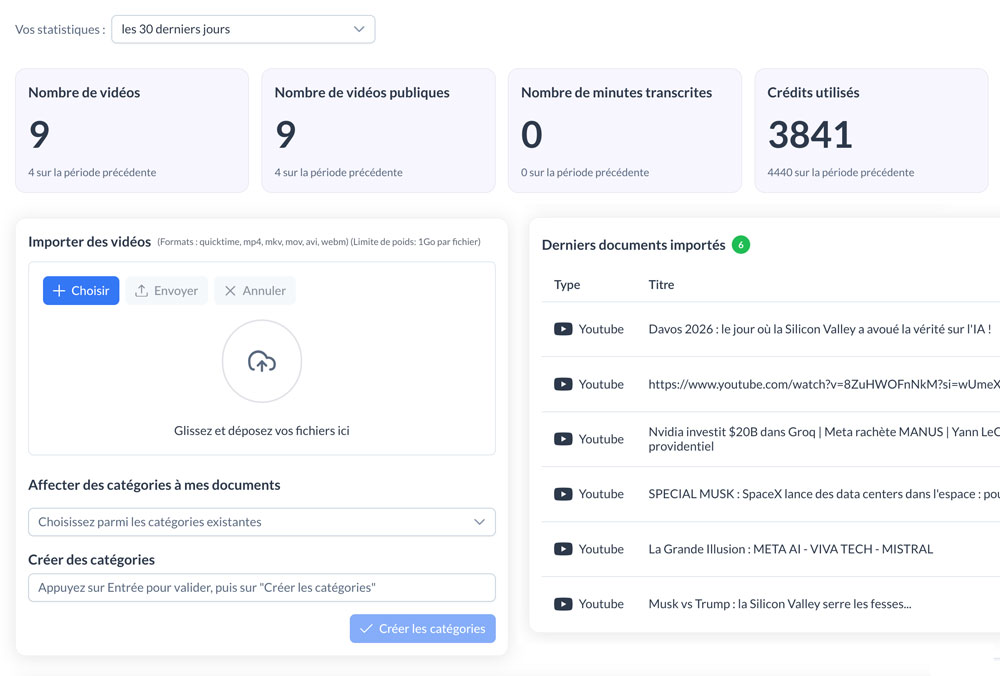
You import a video (meeting, interview, demo…).
AI analyzes and transcribes it while identifying important moments (timecodes). You can find a specific excerpt in just 2 clicks.
One video = endless content possibilities
How does it work?
Video import in Narrathèque turns your replays, interviews, and meetings into structured, searchable, and reusable content.
Your video becomes an actionable resource
Simply import your video file into Narrathèque.
AI then launches automatic analysis to structure the content and help you turn it into value.
Once the video is imported, you can:
- find the full transcript
- get an automatic summary
- classify the video into a category
- identify the dates, topics, and locations mentioned
- correct detected names or information
👉 Result: a raw video becomes clear, structured, and actionable content.
1 Import the video
Select your video from your computer and upload it to the application.
It then appears in the interface and in the File Library.
2 Analyze and enrich
AI automatically generates a summary, detects tags, dates, locations, and key elements in the content to make it easier to use.
3 Search and reuse
Search for a keyword in the transcript, jump to the right timecode, then turn the video into an article, a post, or SEO-optimized content.
3 practical use cases to get more out of your videos
Meetings, interviews, demos, replays: Narrathèque helps you find precise information, produce a clear summary, or generate content from the transcript.
Find a specific excerpt
Looking for an exact moment in a 1-hour meeting?
Just type a keyword into the transcript, such as “cash flow”, “budget”
Narrathèque takes you directly to the right timecode.
“Find the moment when Michael talks about the communication budget.”
Create a summary from a replay
After import, AI uses the transcript to automatically summarize the video content.
You can then ask for a more detailed summary with the key ideas, the decisions made, and the actions to keep in mind.
“Create a summary with 5 key points, 3 decisions made, and the next actions.”
Repurpose into content
From an interview, presentation, or replay, you can directly generate a blog article, a LinkedIn post, or an FAQ.
AI works from the transcript.
“Based on this video, write a 500-word SEO article and a LinkedIn post.”
A video example
This video shows how video import works in Narrathèque: file upload, automatic analysis, transcript navigation, and content reuse.
Turn your videos into reusable content
You have videos sitting on your hard drive, but you never find the time to make use of their content.
When everything is video… nothing really gets reused.
Video import turns your replays, interviews, and meetings into actionable, structured, and easy-to-reuse content.
Your videos contain valuable insights that are just sitting unused on your hard drives.
A video often contains real gems… but as long as it stays a video, it remains unusable.
The problem is that over time:
-
you can no longer find where an idea was mentioned
-
you no longer know what to extract
-
you redo instead of reuse
👉 Result: lost ideas, and wasted hours.
80% of ideas = never reused
They exist… but stay trapped inside “replays” and recordings we never watch again.
40 min
to find an excerpt
“It was in the video” … yes, but when exactly? So you move forward, backward, and lose the thread.
3x more time = redoing everything
Without a transcript / summary, every piece of content (post, article, summary) starts again from scratch.
Our other complementary features

YouTube Import
Audio Import
URL Import
Frequently asked questions
This section is only here for SEO purposes. Otherwise, you could simply ask your questions to our ChatBot connected to the knowledge base of our solution…
Nous ne proposons pas pour le moment de version en marque blanche à proprement parlé, nous étudierons toutes les demandes en fonction des opportunités.
En fonction du territoire que vous avez choisi (pour le moment Europe ou Canada), vos données sont stockées sur des serveurs dédiés et sécurisés. Vos données sont privées et ne serviront jamais à entrainer un quelconque modèle.
Vous pouvez créer autant de base que nécessaire.
Oui, vous pouvez créer des catégories différentes dans chaque base et ainsi affiner les requêtes.
Do you have specific needs? Let’s talk about your project.
narratheque.io is the public version of the KDBCore application core by Jolifish Europe. It allows dedicated environments to be created for specific needs and dedicated connection or hosting constraints. Feel free to book a meeting to tell us about your project.